
|
This article is about something that was cut or scrapped This article contains information about an unreleased subject that has partial information available - despite not being officially released - and may contain speculation ahead. |
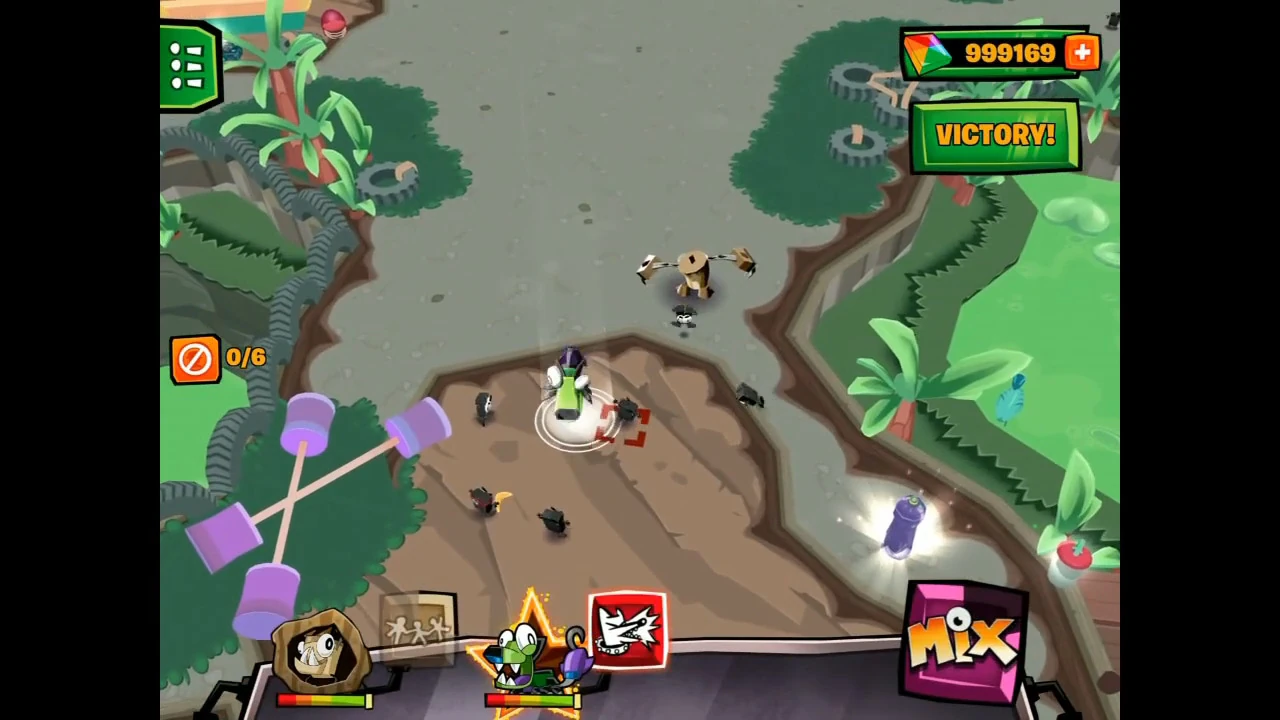
Unused elements of Calling All Mixels in action, such as a "Victory" button and unlimited Cubits.
In video game development, unused content refers to features, assets, or ideas that were created during development but removed before the final release. Some of these elements may have been altered or hidden, but they can still be observed in early promotional materials or within the game's source code. Others were either removed entirely or never advanced beyond the conceptual phase, typically confirmed through developer statements or early game illustrations.
This page documents all known instances of unused content found in Mixels games.
For the LEGO equivalent, see Prototypes. For the Cartoon Network equivalent, see Concept Art.
Calling All Mixels
Early Rescue Popups
These were earlier versions of the popups that appear after saving a Mixel. Interestingly, Vulk appears here in his prototype colors.


Early Loading Screen
Instead of a rotating Cubit, the game was originally planned to have a static loading text with a Nixel beside it, centered on a monochromatic background. The Nixel-themed design implies this may have been an early iteration of the outpost defense loading screen.


Early Outpost Defense Popups


Unused Comic Panels
Within the game files, there are indications that the game was originally intended to include more comic panels than those that made it into the final release. Two of these unused panels are referenced in string entries:
Comic_Panel_Tutorial3_01 = We need a Collector to gather smaller Cubits from that Rainbow Cubit. Lets mix one up!
Comic_Panel_Tutorial3_05 = Find even more MIXES. However lookout for MURPS!
A few more can also be found among unused sprites; these include:
- A panel showing Flain asking Seismo to "tell him" - likely about what happened to the other Mixels.
- A panel showing Flain preparing to use the Cubit's power.
- A panel showing Series 1 Mixels mixing together. While it's unclear where this would have appeared in the game, the image was used in promotional materials. It is likely that this panel would have been accompanied by the second unused string entry.
- Unfinished versions of existing panels with minor alterations.


Unused Voiceover Toggle Button
In the settings menu, there was intended to be an option to toggle Mixels' voices on and off. Two assets were created for this feature, but it has been scrapped, likely because the game only contained short voice clips, which were ultimately categorized as sound effects.

Although unused, the feature still has a variable name present in the options menu code.
	[SerializeField]
	private EasyButton _btnBack;

	[SerializeField]
	private EasyButton _btnToggleSound;

	[SerializeField]
	private EasyButton _btnToggleMusic;

	[SerializeField]
	private EasyButton _btnToggleVoiceover; // Here!

	[SerializeField]
	private EasyButton _btnLanguage;

	[SerializeField]
	private EasyButton _btnPlayerSettings;

	[SerializeField]
	private EasyButton _btnResetProfile;

	[SerializeField]
	private GameObject _playerSettingsPanel;

	[SerializeField]
	private GameObject _changeLanguagePanel;
Scrapped Flag Icons
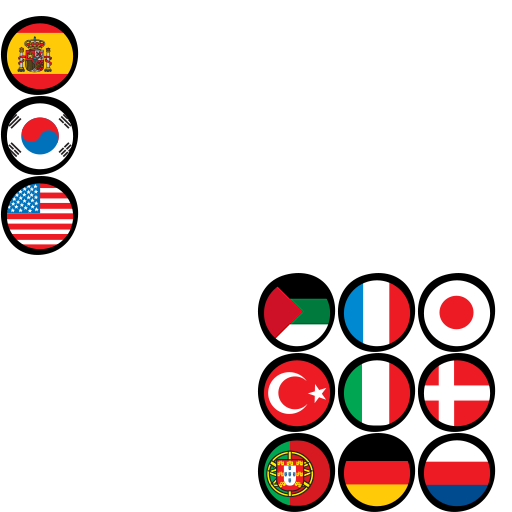
In the settings menu, localization options were originally intended to be represented by flags rather than plain text. The flags chosen for each language were as follows:
- English: The flag of the United States.
- Arabic: The flag of Hejaz/Arab Revolt.
- Danish: The flag of Denmark.
- German: The flag of Germany.
- Spanish: The flag of Spain.
- French: The flag of France.
- Italian: The flag of Italy.
- Japanese: The flag of Japan.
- Korean: The flag of South Korea.
- Portuguese: The flag of Portugal.
- Russian: A miscolored version of the Russian flag.
- Turkish: The flag of Turkey.
Unused Mission Text
The game originally had different messages for mission completion or failure. Since the code for it wasn't structured to support translation, it's likely these messages were intended for debugging purposes.
	private void OnMissionCompleted(Mission mission)
	{
		base.gameObject.SetActive(true);
		this._success = true;
		this._title.text = "Mission Completed";
		this._message.text = "You have successfully completed the mission. Grats!";
	}

	private void OnMissionFailed(Mission mission)
	{
		base.gameObject.SetActive(true);
		this._success = false;
		this._title.text = "Mission Failed";
		this._message.text = "You have failed to complete the mission. Boo!";
	}
Unused "VICTORY!" Button
In some of the game's promotional materials[1][2], a button labeled "VICTORY!" can be seen. According to the game's code, this button was designed solely for debugging purposes:
		if (!string.IsNullOrEmpty(serverType) && serverType.Equals("dev"))
		{
			GameObject winBtn = GameObject.Find("WinButton");
			if (winBtn != null)
			{
				winBtn.transform.GetChild(0).gameObject.SetActive(true);
				winBtn.GetComponentInChildren<EasyButton>().OnClick = delegate(GameObject x)
				{
					Mission.Instance.AutoWin();
				};
			}
		}
When activated, It would allow the player to instantly win the level and unlock any available Mixels. The corresponding code is shown here:
	public void AutoWin()
	{
		string serverType = NativeBridge.GetServerType();
		if (!string.IsNullOrEmpty(serverType) && serverType.Equals("dev"))
		{
			this._completed = true;
			Messenger<Mission>.Invoke("missionCompletedMessage", this);
			for (int i = 0; i < this._missionObjectives.Length; i++)
			{
				if (this._missionObjectives[i] is RescueMixels)
				{
					CharacterId rescue = (this._missionObjectives[i] as RescueMixels).GetUnlockedMixel();
					if (rescue != CharacterId.Invalid && SingletonBehaviour<UserInfo>.instance.Data.PlayerMixels.Find((MixelData x) => x.CharID == rescue) == null)
					{
						this._missionObjectives[i].Completed = true;
						SingletonBehaviour<UserInfo>.instance.UnlockMixel(rescue);
					}
				}
			}
		}
	}
Unused "Menu" Buttons
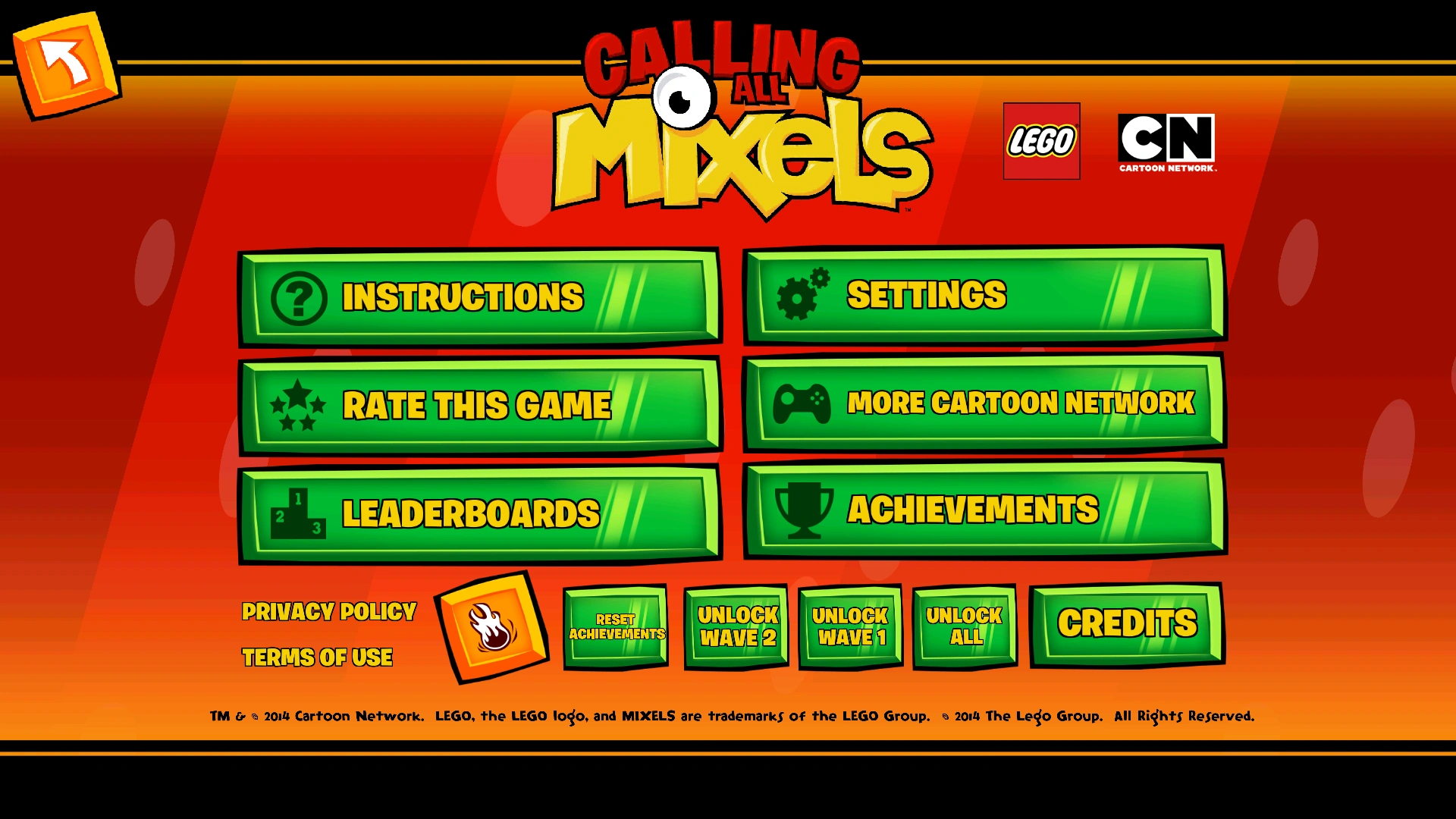
In the "Menu" (also referred to as "CN Menu" in the game's code), there are several unused buttons, including:
- "Achievements" and "Leaderboards" (Android): These buttons are present and functional in the iOS version, where they integrate with Apple's "Game Center". However, in the Android version, they remain unused but still present in the game's client. Even if accessed, they do not function.
- Debug Menu Button: A yellow-orange button with a fire icon that transports the player to the "Debug Character Menu".
- "Reset Achievements" button: It is non-functional in the Android version, while it presumably resets all achievements in the iOS version.
- "Unlock Wave 1", "Unlock Wave 2", and "Unlock All": These are debugging buttons designed to unlock content early. As their names suggest, each button unlocks different sets of content: "Unlock Wave 1" unlocks Series 1 content, "Unlock Wave 2" unlocks Series 1 and Series 2 content, and "Unlock All" unlocks everything, including Series 3 content. Unlocked content includes all Mixels at max level, all Mixes, lands, levels, stars, extras, Cubit Defense Towers, and Cubit Collectors. Additionally, the player receives 999999 Cubits and 100 of each ingredient. The corresponding code is shown here:
public void UnlockAll(bool unlockWave2 = true, bool unlockWave3 = true)
{
	this.Data.PlayerMixels = new List<MixelData>();
	int num;
	if (!unlockWave2 && !unlockWave3)
	{
		num = 12;
	}
	else if (unlockWave2 && !unlockWave3)
	{
		num = 43;
	}
	else
	{
		num = 60;
	}
	for (int i = 0; i < num; i++)
	{
		if (i != 3 && i != 4 && i != 5 && (i < 12 || i > 25) && (i != 28 && i != 33 && (i < 37 || i > 42)) && i != 46 && i != 50 && i < 54)
		{
			this.UnlockMixel((CharacterId)i);
		}
	}
	foreach (MixelData mixelData in this.Data.PlayerMixels)
	{
		mixelData.Level = 30;
	}
	this.Data.Roster = new List<CharacterId>();
	this.Data.Roster.Add(CharacterId.Flain);
	this.Data.Roster.Add(CharacterId.Krader);
	this.Data.Roster.Add(CharacterId.Teslo);
	foreach (MixingLabIngredientResultData mixingLabIngredientResultData in MixingLabIngredientTableDB.Instance.MixingLabResults)
	{
		this.UnlockMixingLabRecipe(mixingLabIngredientResultData.Ingredient1, mixingLabIngredientResultData.Ingredient2);
	}
	this.Data.UnlockedMixes.Add(CharacterId.Inf_Max);
	this.Data.UnlockedMixes.Add(CharacterId.Crag_Max);
	this.Data.UnlockedMixes.Add(CharacterId.Elec_Max);
	this.Data.UnlockedMixes.Add(CharacterId.Mix_Krader_Volectro);
	this.Data.UnlockedMixes.Add(CharacterId.Mix_Flain_Seismo);
	this.Data.UnlockedMixes.Add(CharacterId.Mix_Shuff_Zorch);
	this.Data.UnlockedMixes.Add(CharacterId.Mix_Zaptor_Vulk);
	this.Data.UnlockedMixes.Add(CharacterId.Mix_Zorch_Teslo);
	this.Data.LevelAccess.Infernites = 100;
	this.Data.LevelAccess.Cragsters = 100;
	this.Data.LevelAccess.Electroids = 100;
	if (unlockWave2)
	{
		this.Data.UnlockedMixes.Add(CharacterId.Frost_Max);
		this.Data.UnlockedMixes.Add(CharacterId.Flex_Max);
		this.Data.UnlockedMixes.Add(CharacterId.Fang_Max);
		this.Data.UnlockedMixes.Add(CharacterId.Mix_Flurr_Chomly);
		this.Data.UnlockedMixes.Add(CharacterId.Mix_Flurr_Kraw);
		this.Data.UnlockedMixes.Add(CharacterId.Mix_Gobba_Tentro);
		this.Data.UnlockedMixes.Add(CharacterId.Mix_Slumbo_Jawg);
		this.Data.UnlockedMixes.Add(CharacterId.Mix_Lunk_Balk);
		this.Data.LevelAccess.Flexers = 100;
		this.Data.LevelAccess.Frosticons = 100;
		this.Data.LevelAccess.Fanggang = 100;
	}
	if (unlockWave3)
	{
		this.Data.UnlockedMixes.Add(CharacterId.Glorp_Max);
		this.Data.UnlockedMixes.Add(CharacterId.Spikel_Max);
		this.Data.UnlockedMixes.Add(CharacterId.Wiz_Max);
		this.Data.UnlockedMixes.Add(CharacterId.Mix_Glomp_Mesmo);
		this.Data.UnlockedMixes.Add(CharacterId.Mix_Footi_Mesmo);
		this.Data.UnlockedMixes.Add(CharacterId.Mix_Glurt_Wizwuz);
		this.Data.UnlockedMixes.Add(CharacterId.Mix_Torts_Scorpi);
		this.Data.UnlockedMixes.Add(CharacterId.Mix_Hoogi_Magnifo);
		this.Data.LevelAccess.Glorpcorp = 100;
		this.Data.LevelAccess.Spikel = 100;
		this.Data.LevelAccess.Wiztastics = 100;
	}
	this.Data.Ingredients = new List<UserIngredientData>();
	foreach (IngredientsDB.IngredientData ingredientData in IngredientsDB.Instance.Ingredients)
	{
		this.AddIngredientToInventory(ingredientData.Type, 100);
	}
	this.Data.TutorialCompleted = true;
	OutpostProgressModel outpostProgress = this.GetOutpostProgress(OutpostType.INFERNITES_OUTPOST);
	outpostProgress.MissionCompleted = true;
	outpostProgress.UpgradeExtractorLevel();
	this.TutorialOutpostMissionCompleted = true;
	this.TutorialOutpostBuildPart2Completed = true;
	this.TutorialMixMixelsCompleted = true;
	this.TutorialOutpostWaveCompleted = true;
	this.TutorialWorldMapCompleted = true;
	this.TutorialCollectCubitsCompleted = true;
	this.TutorialSubMenuCompleted = true;
	this.TutorialFirstRealWaveCompleted = true;
	this.Data.Cubits = 1000000;
	int count = MapDB.Instance.Maps.Count;
	for (int j = 0; j < count; j++)
	{
		if (MapDB.Instance.Maps[j].MapDataType == RegionType.INFERNITES || MapDB.Instance.Maps[j].MapDataType == RegionType.CRAGSTERS || MapDB.Instance.Maps[j].MapDataType == RegionType.ELECTROID || ((MapDB.Instance.Maps[j].MapDataType == RegionType.FLEXERS || MapDB.Instance.Maps[j].MapDataType == RegionType.FANGGANG || MapDB.Instance.Maps[j].MapDataType == RegionType.FROSTICONS) && unlockWave2) || ((MapDB.Instance.Maps[j].MapDataType == RegionType.GLORPCORP || MapDB.Instance.Maps[j].MapDataType == RegionType.SPIKEL || MapDB.Instance.Maps[j].MapDataType == RegionType.WIZTASTICS) && unlockWave3))
		{
			this.SaveUnlockedDifficultyData(MapDB.Instance.Maps[j].MapFileName, MissionDifficultyManager.MAX_DIFFICULTY);
		}
	}
	foreach (ExtraData extraData in ExtrasDB.Instance.Extras)
	{
		this.UnlockExtra(extraData);
		if (extraData.Type == ExtraType.INSTRUCTIONS)
		{
			this.UnlockExtraAllPages(extraData);
		}
	}
}
Unused Debug Menu
In the game files, there’s a hidden level (or "scene" in Unity terms) that was only accessible to developers. It was created to test playable entities like Mixels, Mixes, and Maxes. The scene includes several buttons to assist with testing, such as:
- "Add Character" Button: Pressing this brings up a list of all playable entities. Users can select a character along with the special ability they want it to have. Up to three entities can be spawned at once, and interestingly, combinations that aren't possible in normal gameplay can be created, including duplicates, Mixes alongside two additional entities, or Maxes paired with one or two others.
- "Heal Mixels" Button: As the name suggests, it fully restores all Mixels' health.
- "Skip Cooldown" Button: It resets the recharge timers for all special abilities, allowing them to be used again immediately.
- "Spawn (X) Nixels" Buttons: Pressing these buttons would launch Nixels into the center of the map. They remain idle until the player gets close, at which point they start attacking. There are three buttons available: one spawns a single Nixel, another spawns five, and the third spawns ten.
- "Destroy" and Switch Buttons: For every spawned entity, two buttons are displayed, one to remove the entity from the scene, and another showing the entity’s name, which when tapped allows you to replace it with a different entity.
- "EXIT DEBUG SCENE" Button: Exits the debug scene and returns the user back to the main menu.
Unused Cutscenes
In the game files, four unused cutscenes can be found, all of them are Mix transitions. Based on their string entries, they appear to have been intended as part of the game’s extras.
CUTSCENE_MIX_1 = Mix 1
CUTSCENE_MIX_2 = Mix 2
CUTSCENE_MIX_3 = Mix 3
CUTSCENE_MIX_4 = Mix 4
There is also evidence that 'upset' cutscenes were planned for the four Mixels who never received them: Vulk, Zorch, Teslo, and Volectro. However, no video files have been found, suggesting the animations were never completed.
CUTSCENE_TESLO_UPSET = Teslo Is Upset
CUTSCENE_VOLECTRO_UPSET = Volectro Is Upset
CUTSCENE_VULK_UPSET = Vulk Is Upset
CUTSCENE_ZORCH_UPSET = Zorch Is Upset
In addition to the "upset" cutscenes, there's another cutscene titled "Cubit Rewards" in the string entries. However, there's no video or any hint of what the cutscene might have shown, and the title is too vague to interpret.
CUTSCENE_CUBIT_REWARDS = Cubit Rewards
Unused Levels
Among the game’s string entries, there are 23 unused quest names and descriptions that were planned for the initial three lands. The reasons for their removal are unknown. While many of these unused quests appear to feature unique objectives, a few are similar to quests that already existed in the game’s first version or were later reused for quests introduced in subsequent updates.
| Quest Title | Location | Quest Overview |
|---|---|---|
| Spawners Everywhere! | Infernite Land (Quest #1) | Oh, no! Nixel spawners are popping up all over the place. Stop those Nixels now! |
| Race Against Time | Collect all the gifts along the path, but make it quick! | |
| Save the Castaway | Infernite Land (Quest #2) | You need to get to the island and save your friend! But how? There must be a secret passage somewhere…. |
| Some Likes It Hot | The Infernites are feeling a bit chilly--it's almost down to 200 degrees! Turn on some Lava Plants and warm things up. | |
| Go with the Flow | Infernite Land (Quest #3) | What's a garden without a lovely lava flow? Reset the switches to turn Lava Falls back on. |
| The Floor Is Made of Lava | The volcanoes are acting up! Infernites love lava, but not if it burns up their lunch. Reach the garden without letting the lava touch your picnic food. | |
| Tourist Distraction | Infernite Land (Quest #4) | Check out all the hottest tourist spots in town. |
| No Place Like Home | A no-good Nixel stole the key to your house! Catch him before he gets in and steals your Buttermeleon collection! | |
| Deserted Island | Cragster Land (Quest #1) | A gift has been placed on an island that you can't reach. Activate switches to build the pillars and gain access to your reward. |
| What's Yours Is Mine | That runaway mine cart is filled with treasure! Use elements in the map to stop the cart and grab the goodies. | |
| %CRAGSTER_AREA2_QUEST1_TITLE_% | Cragster Land (Quest #2) | %CRAGSTER_AREA2_QUEST1_DESC_% |
| For Your Health | Collect rock leaves and take them to the mayor's house to heal him. | |
| Ready Ore Not | Cragster Land (Quest #3) | Collect enough pieces of valuable ore to buy new sneakersandals. |
| Having a Ball | Cragster Land (Quest #4) | Find the rock ball and bring it back to the rock ball field in time for the next game. |
| You Take the High Road | Reach the destination before the Nixel does, but use a different path. | |
| The Great Hexaglass Game | Electroid Land (Quest #1) | Nixels put something on the hexaglass field, and you need to fetch it. But don't get lost in that crazy maze! |
| Dancing Machine | Whoa! Where did the dance floor go? You need to raise it and activate it so you can dance all night! | |
| You Shall Not Pass | Electroid Land (Quest #2) | Major Nixel is blocking the path to the dance floor. Defeat him so you can show off your new dance moves. |
| In the Spotlight | Turn on the correct lights to illuminate the dance floor. | |
| Special Delivery | Electroid Land (Quest #3) | Get the lightbulb, the circuit and the antenna, and use them to build a server. |
| Major Hassle | Turn off all the windmill and lights to make Major Nixel come out. | |
| Not So Secret Party | Electroid Land (Quest #4) | Legend says there's a Secret Dance Party hidden somewhere around here. Open all the doors until you find it! |
| Nixel Error | Nixels are trying to shut down the electroputer. Don't let them do it! |
Unused Ingredients Menu
Collectible items, such as the ceramic figurines, were intended to have their own dedicated in-game menu, displaying their names and descriptions, similar to how Cubit Defense Towers and Cubit Collectors appear in the "Recipes" menu.


Item names and descriptions can still be found in string entries and are as follows:
INFERNITE_COMMON = Fire Sprinkler
INFERNITE_UNCOMMON = Spicy Coconapple
INFERNITE_RARE = Ceramic Dragocat
INFERNITE_COMMON_DESC = Perfect for fertilizing plants that thrive on fire.
INFERNITE_UNCOMMON_DESC = A delicious treat, if you don't mind a flaming tongue.
INFERNITE_RARE_DESC = A rare collectible, it mixes a dragon with a cat.
CRAGSTER_COMMON = Roller Slate
CRAGSTER_UNCOMMON = Rockytop
CRAGSTER_RARE = Ceramic Bunnyram
CRAGSTER_COMMON_DESC = Fast, fun footwear with wheels made of rock.
CRAGSTER_UNCOMMON_DESC = A portable computer that's 100 pounds of solid stone.
CRAGSTER_RARE_DESC = A rare collectible, it mixes a ram with a bunny.
ELECTROID_COMMON = Neon Noodle
ELECTROID_UNCOMMON = Kaboombox
ELECTROID_RARE = Ceramic Beel
ELECTROID_COMMON_DESC = A noodly, doodly sign that lights up the night.
ELECTROID_UNCOMMON_DESC = Crank up the tunes and electrify your ears!
ELECTROID_RARE_DESC = A rare collectible, it mixes a bee with an eel.
Unused Age Confirmation Popup
The game includes string entries, a script, and an almost empty Unity scene for an "Ask For Age" popup.
AGEGATE_TITLE = HOW OLD ARE YOU?
AGEGATE_BUTTON = CONFIRM
MAIN_AGEGATE_TITLE = Please Select Your Age
MAIN_AGEGATE_EXPLANATION_TITLE = Content
MAIN_AGEGATE_EXPLANATION_MESSAGE = This is why there is restricted content.
ASK_AGE_DESCRIPTION = Please select your age:
ASK_AGE_CONFIRM = CONFIRM
ask_age_error = [FF0000]The age you entered is invalid
AGEGATE_WARNING_TITLE = CUBITS
AGEGATE_WARNING_CONTENT_ios = Buying Cubits costs real money and will charge your iTunes account.
AGEGATE_WARNING_CONTENT_android = Buying Cubits costs real money and will charge your Google Play account.
AGEGATE_WARNING_CONTENT_amazon = Buying Cubits costs real money and will charge your Amazon account.
AGEGATE_EXPLANATION_TITLE = PERSONALIZED CONTENT
AGEGATE_EXPLANATION_DESC = Due to your age, you'll have a personalized experience without in-app purchases and promotional content.
Achievements and Leaderboards
Unused Series 2 and Series 3 Outposts Achievements
Among achievement string entries are two unused achievements intended for building Series 2 and Series 3 Cubit Collectors, suggesting that outpost defense sections for the remaining playable tribes were considered at some point.
ACHIEVEMENT_049MIXALLSERIES2TOWERS_TITLE = %ACHIEVEMENT_049MIXALLSERIES2TOWERS_TITLE_%
ACHIEVEMENT_049MIXALLSERIES2TOWERS_DESC =  Mix all Series 3 towers
ACHIEVEMENT_051MIXALLSERIES3TOWERS_TITLE = %ACHIEVEMENT_051MIXALLSERIES3TOWERS_TITLE_%
ACHIEVEMENT_051MIXALLSERIES3TOWERS_DESC =  Mix all Series 3 towers
An existing achievement, "Base Defender", was also planned to be updated to require building six Cubit Collectors instead of three. However, this update was never implemented, as Series 2 outposts, let alone Series 3, were never developed.
ACHIEVEMENT_029DEF6BASES_TITLE = Base Defender
ACHIEVEMENT_029DEF6BASES_DESC = Defend 6 different Bases
Unused Leaderboards
There are four unused leaderboards, each tracking how many quests the player has completed at a specific difficulty. They were likely scrapped because quests are finite, unlike other leaderboards that can be continuously progressed.
LEADERBOARD_005EASYQUESTS_TITLE = Successful Easy Peasy Quests
LEADERBOARD_005EASYQUESTS_UNIT1 = Quests
LEADERBOARD_006MEDIUMQUESTS_TITLE = Successful Challenging Quests
LEADERBOARD_006MEDIUMQUESTS_UNIT1 = Quests
LEADERBOARD_007HARDQUESTS_TITLE = Successful Super Tough Quests
LEADERBOARD_007HARDQUESTS_UNIT1 = Quests
LEADERBOARD_008VHARDQUESTS_TITLE = Successful Extreme Chaos Quests
LEADERBOARD_008VHARDQUESTS_UNIT1 = Quests
Early Achievement Requirements
Some achievements had more demanding and/or differently worded requirements during early development, suggesting they were later adjusted to be easier, with the exception of “It’s Your Birthday!”, which was actually made slightly more difficult.
| Achievement | Early Version | Final Version |
|---|---|---|
| Crazy Collector | Collect 30 Surprise Boxes in a single Collect-a-thon | Collect 10 collectibles in a single Collect-a-thon Quest |
| Power-less | Complete 25 combats in Super Tough or Extreme Chaos difficulty without any Power | Complete 25 medium or harder combats without using any powers |
| King of Quests | Find a total of 500 items in Surprise Boxes | Find a total 120 Quest Items |
| Rapid Fire | Defeat 15 Nixels in less than 5 seconds | Defeat 10 Nixels in less than 5 seconds |
| It's Your Birthday! | Open a total of 500 Surprise Boxes | Open 750 Surprise Boxes during quests |
| Lump Sum | Collect more than 250 Cubits from a single Collector visit | Collect more than 50 Cubits from a single Collector visit |
| Mr. Moneybags | Earn and collect a total of 1000 Cubits | Collect a total of 750 Cubits |
Unused Outpost Notification Assets for Series 2 & 3 Lands
Similar to the level selection menus in the Series 1 lands, the other lands were also intended to have notifications informing the player when Cubits could be collected from Cubit Collectors or when Nixels had attacked the outpost. Like some unused achievements, this suggests that Series 2 and 3 outposts may have been planned for the game. However, unlike the Series 1 assets, there is no big Rainbow Cubit asset to indicate an outpost being unlocked.


Unused UI Assets
The game contains several leftover UI elements that were ultimately unused, most notably:
- A red circular button marked with an "X," which served as an early version of the yellow square cancel button used during Mixing in the first version of the game.[3][4] This same button is also present in unseen debug menus.
- Early assets for the “Mix Manual” menus.
- Early confirm and cancel buttons, with the latter also appearing in an unused “filter” popup.
- A wider version of the Mix button.
- A disabled special attack icon.


Unused 3D Assets and Textures


Alternative Glorp Corp Soundtrack
In a preview for update 3.0.0[2], the footage features an alternate version of Glorp Corp Land's exploration theme, different from the one used in the final game.
Early Game Illustrations
These images showcase early visual concepts from the game's development. While it's unclear whether these designs were ever fully implemented into a playable build, some assets did make it into the final release. Notable details include:
- A customized version of the game's main font, Burbank Big Condensed, using outlines and a white drop shadow effect.
- Series 1 Mixels used their prototype artwork.
- The first Shuff & Zorch Mix appears here before being replaced by another version.
- "Lands" used to be referred to as "Regions".
 Early main menu.
 Early 'World Map" menu. Featuring incomplete land artwork.
 Early "Mission Select" menu.
 Early "Mixel Select" menu.
 A slightly different version of it.
 Early "Mixels" menu combined with the "Mix Manual".
 The custom font used within these images. Found in the game files.
 The placeholder background used in the "Mixel Select" menu. Found in the game files.


Early Concept Art
These are early concept art that were created during the game's pre-production phase. Given their developmental stage, most were likely never implemented in a playable build.


Mixels Rush
Early Game Title: "Mixels Quest"
When inspecting the game’s pseudocode, four different functions refer to the project as “Mixels Quest,” suggesting it may have been either the original title or a placeholder. The name appears to come from the folder path used by either the game designer, Gustavo Bazerque[5][6], or the programmer, Gustavo Furini[6]: "/Users/gustavo/Dev/mixels-quest/". This implies that "Mixels Quest" may have been an early working title before the developers settled on "Mixels Rush".
thunk_FUN_00308f78(&DAT_00365777,s_/Users/gustavo/Dev/mixels-quest/_0036577c,0x20,
                     s_this_!=_nullptr_003657c2);

  thunk_FUN_00308f78(s_getMember_00363781,s_/Users/gustavo/Dev/mixels-quest/_0036378b,0x6c,
                     s_member_003637c3);

thunk_FUN_00308f78(s_getMemberbyName_00365767,s_/Users/gustavo/Dev/mixels-quest/_0036378b,0x8 9,

  thunk_FUN_00308f78(s_LevelBuilder_003646a4,s_/Users/gustavo/Dev/mixels-quest/_003646b1,0x2b,
                     &DAT_003646f3);
Placeholder Characters
In addition to the other Mixels assets, there are three character assets featuring yellow, purple, and green characters. These colors suggest they represent members of the Weldo, Muncho, and Glorp Corp tribes, respectively. Each of these assets was associated with three character entries (those being constructor1?, constructor2?, constructor3?, mooncho1?, mooncho2?, mooncho3?, GlorpCorp1?, GlorpCorp2?, GlorpCorp3?), indicating that they were early placeholders for Series 6 Mixels.


Unused Floor Assets
Earlier versions of the floor assets exist and while they weren’t used in the final game, they are still utilized in the level editor, "Tiled", for level design.


Early Levels
Several unused level files exist in the game data. When restored through modding, they show minor tile differences from existing levels, with the most noticeable change being the objectives required to earn stars.
Unused Level Properties
Levels in Mixels Rush were created with "Tiled Map Editor", and inside the game’s .tmx files there are a few variables that were never used:
- Lose Objectives: Three “lose” conditions are listed, structured in the same way as the star objectives. They were possibly intended as secondary fail conditions or actions to avoid, but they do not function even when enabled.
- Inventory: A variable that can hold one or more Mixels. It appears in many levels but has no effect. It may have been an early mechanic for carrying Mixels into later levels, a feature that was likely scrapped since Mixels are already carried over by default in the final game.
- Replace with Shoes: Found only in the first Frosticon Land level, set to zero by default. Changing the value doesn’t do anything, and its purpose is unknown.
<property name="FirstLoseActions" value=""/>
<property name="FirstLoseObject" value=""/>
<property name="FirstLoseObjectType" value=""/>
<property name="FirstLoseValue" value=""/>
<property name="SecondLoseActions" value=""/>
<property name="SecondLoseObject" value=""/>
<property name="SecondLoseObjectType" value=""/>
<property name="SecondLoseValue" value=""/>
<property name="ThirdLoseActions" value=""/>
<property name="ThirdLoseObject" value=""/>
<property name="ThirdLoseObjectType" value=""/>
<property name="ThirdLoseValue" value=""/>
<property name="inventory" value=""/>
<property name="replaceWithShoes" value="0"/>
Unused Star Objectives
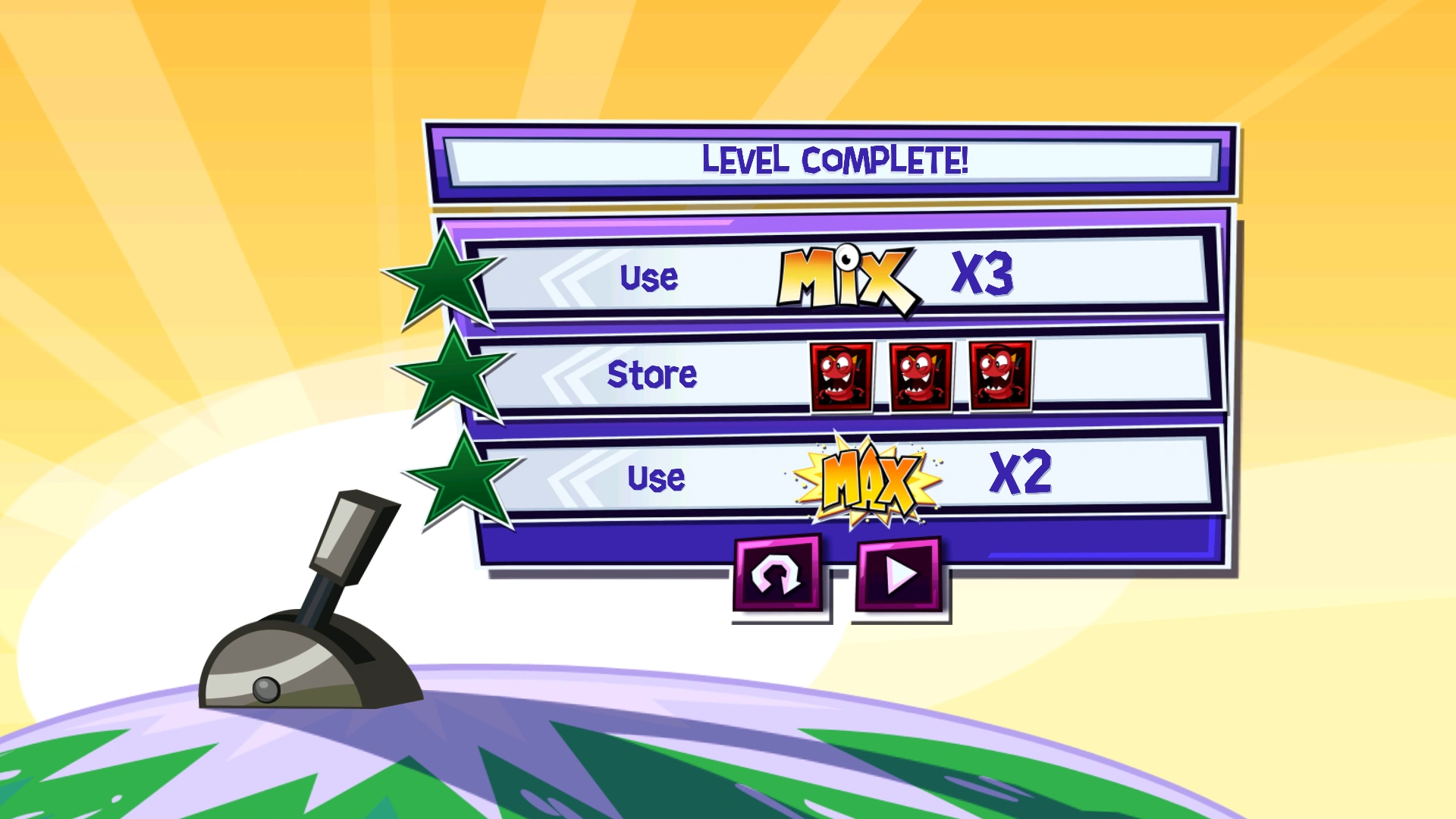
Several objectives were originally planned for inclusion in the game but were ultimately unused. These include:
- Make a Quantity of Mixes Objective: This objective required the player to create a set number of Mixes by combining any two Mixels. Murps and Maxes were excluded from the tally. Although this objective type is present in some unused levels, it was ultimately replaced in the final release with similar objectives that also counted Maxes toward the total.
- Make a Quantity of Maxes Objective: This objective required the player to create a set number of Maxes by combining three Mixels of any tribe. Murps and Mixes were excluded from the tally.
- Store Objective: This objective involved “storing” certain items or Mixels. Its exact function is unclear, but it likely required keeping them unused to carry over into later levels. Reactivating it has no effect, only displaying “Store” next to three Burnard icons.
Unused Items
Aside from the Hamlogna Sandwich item, which is only seen in early game illustrations, it appears that additional items were once planned for the game.
One unused item is named "Hammer". It's unknown whether this is the same as the Hamlogna Sandwich or a separate item, but unused data suggests it temporarily multiplies a specific stat based on the following values:
[Hammer1]
multiplier = 2
duration = 10
lwfMovie = hammer_item

[Hammer2]
multiplier = 2.5
duration = 15
lwfMovie = hammer_item

[Hammer3]
multiplier = 3
duration = 15
lwfMovie = hammer_item
In the animation files, this item appears to reuse the sprites of the remote controls seen in-game, although this is uncertain. The remote controls already have their own distinct stats defined in the game files. Even if the two are the same item, the remote activates instantly and does not multiply any values, suggesting this may have been an early version of the remote controls or an item that was later replaced by them.
_hammer__bitmaps_control
_hammer__bitmaps_controlWhite
_hammer__bitmaps_electray
_hammer__bitmaps_electric_control.png
_hammer__bitmaps_electric_control_white.png
_hammer__bitmaps_ray_electric.png
Another unused item referenced in the animation files is known as "Nixel Spray". Its exact function is unknown, but based on the name, it can be assumed that it has a negative effect on Nixels.
_nixel_spray__bitmaps_spray.png
_nixel_spray__bitmaps_spray_fx.png
_nixel_spray__bitmaps_spray_particle.png
_nixel_spray__bitmaps_spray_white.png
_nixel_spray_spray
_nixel_spray_spray_fx
_nixel_spray_spray_particle
_nixel_spray_spray_white
Unused Animator Editor
Graphics and strings exist, hinting at the existence of an animation editor. The editor is non-functional but enabled by default.


Unused Cutscenes
The Series 6 update cutscene was meant to be 2 pages instead of 1. The first page would've the same as the final page, but with every character's arms down.
Another unused cutscene found in storyboards would've been featured the appearance a silhouette of King Nixel.


Unused Album Asset
It features:
- A different "MAX" text style.
- Backgrounds and objects from Season 1 shorts.
- A piece of Season 2 Nixel artwork.

Unused Explosion Effect
This unused visual effect features multicolored LEGO pieces. While similar to the loading screen's explosion effect, it differs by displaying the pieces in full color rather than as silhouettes.

Unused Dribbal's Slime
Similar to Slusho, Dribbal was supposed to have slime in his animations, but it was cut for unknown reasons.


Unused Sound Effects
Within the game files, a few unused sound effects can be found, some of which exist only in the files of earlier versions. These include:
- An alternate sound effect intended to play when destroying a rock obstacle.
- Some running sound effects tied to specific tribes, including unused ones for the Frosticons and Fang Gang. In the final game, both instead share the Infernites’ running sounds.
- Two hit sounds exist for Major Nixel, intended for boss fights: one for the hit itself and another for his reaction to being hurt. The latter seems to have been taken directly from Another Nixel.
Early Achievements and Leaderboard Icons
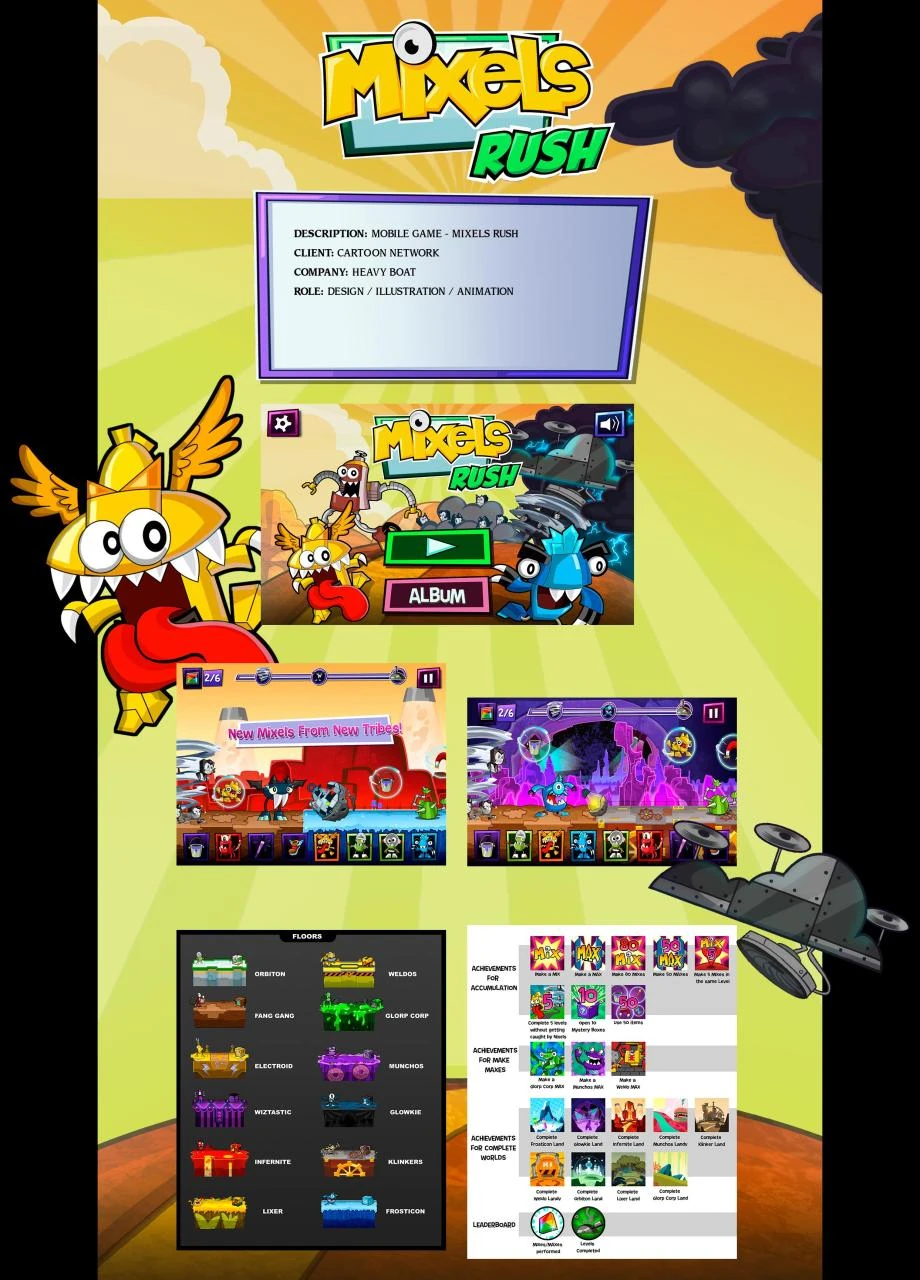
Along with an early version of the main menu, there are also early icons for achievements and leaderboards (meant for the iOS version). Notable differences include:
- The "Mixmaster" (Make 80 MIXes) achievement icon has not been used. Likely an error.
- The "Untouchable" (Complete 5 levels without getting caught by Nixels) achievement featured a Tungster doodle rather than a modified version of his static artwork. Likely a placeholder.
- The "Prime Slime" (Make a Glorp Corp MAX) achievement has a blue background instead of red.
- The "All You Can Eat" (Make a Munchos MAX) achievement had a turquoise background instead of yellow.
- The "Levels Completed" leaderboard had a less bluish green shade.
- Other minor changes.
Early Logo
The early version of the logo featured purple in the place of green, along with some extra shading details.

Early Game Illustrations
These images showcase early visual concepts from the game's development. While it's unclear whether these designs were ever fully implemented into a playable build, some assets did make it into the final release. Notable details include:
- There's no Nixelstorm. Instead, the Nixels appear to be chasing the player on foot.
- Some items, obstacles, and objects feature different designs. For example, the turbine controls are golden in color, resembling the lever from Hamlogna Conveyorbelt.
- The progress bar at the top center of the screen had three spots, possibly indicating that stars were meant to be earned based on how far you advanced through the level.
- There is a Hamlogna Sandwich item. though its purpose remains unknown.
- The floor assets from earlier also appear here.


Mixels.com
Unused Mixes
Wizwuz was originally intended to Mix/Murp with three Mixels: Torts, Footi, and Scorpi. The first two mixes were fully developed. However, due to a typo in the code where Wizwuz was assigned the name 'WizWuz' instead of "Wizwuz", the mixes failed to recognize him as a valid character. As a result, he became the only Mixel on the website without a Mix.
			<!-- Lines 269 to 274 -->

			<mixel name="WizWuz" asset="tools/media/wizwuz.swf" nameAsset="tools/img/mixelNames/WIZWUZ.png" iconAsset="tools/img/mixelIcons/wizwuz.png">
				  <mixelDescription descrip="Whether burping magic spells or hanging around, this goofy assistant loves to perform." />
				  <availCubit type="purple_green" />
				  <availCubit type="purple_tan" />
				  <videoAsset thumb="tools/tempVideo/Wizwuz_320x184.png" videoURL="tools/tempVideo/Wizwuz_640x360.f4v" />
				</mixel>

			 <!-- Lines 621 to 624 -->

			 <mixSet id="pg_4" mix="WizwuzTorts" asset="tools/media/mix_wizwuz_torts.swf" >
				<compatMixel name="Wizwuz"  iconAsset="tools/img/mixelIcons/wizwuz.png" />
			 	<compatMixel name="Torts"  iconAsset="tools/img/mixelIcons/torts.png" />
			 </mixSet>

			 <!-- Lines 645 to 648 -->

			 <mixSet id="pt_4" mix="WizwuzFooti" asset="tools/media/mix_wizwuz_footi.swf" >
				<compatMixel name="Wizwuz"  iconAsset="tools/img/mixelIcons/wizwuz.png" />
			 	<compatMixel name="Footi"  iconAsset="tools/img/mixelIcons/footi.png" />
			 </mixSet>
In addition to the Wizwuz and Scorpi Mix, there was another fully scrapped Mix (or Murp) planned between Zorch and Slumbo. However, when attempting to open the files for either of these mixes, you are greeted with the text "THIS MIX TBD PLACEHOLDER".


Unused Character Back Views
Some Mixels have back view assets that go unused in the website, and their intended purpose remains unknown. Characters with these unused assets include Seismo, Lunk, Kraw, Balk, the Spikels, Mesmo, and Wizwuz.


Unused Infernites Max Activity Assets
In the Infernites Land section, where users would search for the Infernites Cubit behind Fire Flowers near the lava tub, there are four unused image files. These include a Nixel image taken from the episode "Nixels", a Coconapple, a Cookironi, and an ice cream. It's speculated that these were originally intended to appear when the player selects the wrong Fire Flowers.


Unused Cookies Popup
The website has unused assets and code for a popup that thanks the user for accepting cookies. It's fully functional, but the code remains commented out, perhaps because some parts were incomplete, like the absence of a popup that asks you to accept cookies in the first place, which might not have been implemented due to its unnecessity.

Here's the code for it, which, if uncommented and used, would make the popup appear:
		<!-- COMMENT COOKIE WARNING NODE OUT IF NO COOKIE WARNING IS NEEDED. WARNING WILL NOT SHOW IF THIS NODE NOT FOUND
		 <cookieWarning thankyouTxt="Thank you for accepting our cookies" actionTxt="You can now hide this message or find out more about cookies" hideBtn="Hide this message" infoBtn="I want more information" infoURL="http://eucookies.turner.com/"  window="_blank"/>-->
Leftover Assets from Previous Flash Games
Since the minigames are reskins of existing Cartoon Network Flash games, some leftover assets from the originals were carried over.


Early Online Minigames Illustrations
These early visual concepts were created for the online minigames, though there's no confirmation they were ever made into a functional product.


Mix Your Neighbor
Unused Weldos Tribe Assets
Similar to the other Series 6 tribes, the Weldos were intended to appear in the game but were ultimately cut for unknown reasons.


Although the developers never created a level featuring them, they are already implemented in the game, fully functional, and can be easily added through modding. Their piece IDs are listed below:
pieces:
  # Series 6
  weldos:       [41545, 41546, 41547]
  'glorp-corp': [41548, 41549, 41550]
  munchos:      [41551, 41552, 41553]
